
Design.com and Canva get compared constantly, and it is easy to see why. Each platform can take you from creating a logo to building business cards, social posts, and other materials around it. They also go well beyond basic branding, with tools for everything from presentations to websites and marketing content. The differences become clearer once you look at how each platform handles three key areas: the logo maker itself, the brand assets created around it, and the wider design tools available as your business grows.
Here is what we found across all three.
How We Compared Both Platforms
We started with the logo makers, using the same business brief on Design.com and Canva. We looked at the variety and quality of the results, along with how easy each logo was to refine.
For brand assets, we turned the finished logo into a business card on each platform. This gave us a practical way to see how well the colors, fonts, and overall style stayed consistent.
We also explored the wider design tools to see what each platform could handle once the core branding was in place. File formats, licensing, and pricing were also reviewed to understand what users get on free and paid plans.
Quick Verdict
Design.com comes out ahead of Canva for logo creation and building a complete brand around it. Its logo maker gave us more industry-relevant starting points, while the chat-based AI editor made it easy to refine individual elements. The advantage continued once the logo was finished. Design.com automatically carried its colors and fonts into business cards, social posts, and other matching brand assets.
The platform’s wider design toolkit follows the same branding-focused approach. More than 50 tools cover websites, business cards, social media, presentations, printing, and other everyday business needs. This made the process feel connected, rather than treating the logo, brand assets, and wider designs as separate projects.
Canva remains the stronger option for general-purpose creative work. It covers presentations, documents, videos, social content, and many other design tasks in one platform. Its logo and branding features are useful too, and they form part of that much broader toolkit. But across the three areas we compared, Design.com provided the most focused experience for taking a business from its first logo to a consistent set of brand assets and designs.
Comparison Table
| Design.com | Canva | |
| Logo Maker | AI logo maker generates industry-relevant concepts from a business name and keywords, with chat-based AI editing | Template-based logo maker with AI features, drag-and-drop editing, and controls for colors, fonts, graphics, and layouts |
| Logo Library | 500,000+ dedicated logo designs, within 1M+ designs overall across branding and business assets | 1.6M+ templates across 1,000+ design types, though shared templates and popular elements can make some designs feel more familiar |
| Logo Editing | Chat-based AI makes it easy to refine individual elements alongside standard editing controls | Flexible editor with effects, graphics, typography, layout tools, and AI-assisted features for more hands-on editing |
| File Formats | PNG, JPG, SVG, EPS, and PDF cover web, print, and scalable vector use | Supports PNG, JPG, PDF, and SVG exports; EPS is not a standard export option |
| Licensing | Commercial licensing, with Exclusive and Buyout options for eligible logos | Commercial use is supported under Canva’s licensing terms, but templates and stock elements can remain available to other users |
| Brand Assets | Logo colors and fonts automatically carry into matching business cards, social posts, websites, and more | Brand Kit organizes logos, colors, fonts, imagery, graphics, and templates, with stronger brand controls on paid plans |
| Fonts & Elements | 750+ fonts, including 525+ exclusive fonts, plus 62,000+ vector shapes for building brand designs | Extensive library of fonts, icons, illustrations, shapes, photos, graphics, video, and audio, plus custom font uploads on applicable plans |
| Design Tools | 50+ tools connect logos with websites, business cards, social media, presentations, print, QR codes, and other brand needs | Broad suite covering presentations, Docs, Whiteboards, websites, video, social content, photo editing, print, AI tools, and collaboration |
| Best For | Creating a logo and turning it into a complete, consistent brand | General creative work, content production, and team collaboration |
How the Logo Makers Compare
We started with the first part of the comparison: the logo maker. To see how each platform handled the same brief, we created a logo for a fictional flower shop called Bloom & Stem Florals. We used the same business name and keywords, including flowers, floral, elegant, and natural, and then compared the results and editing experience.
Design.com
Design.com’s logo generator builds its results around the business name, industry, and keywords. In our test, it returned a varied mix of floral concepts, with different icons, typography, colors, and layouts.
Here’s what Design.com generated from our flower shop brief:
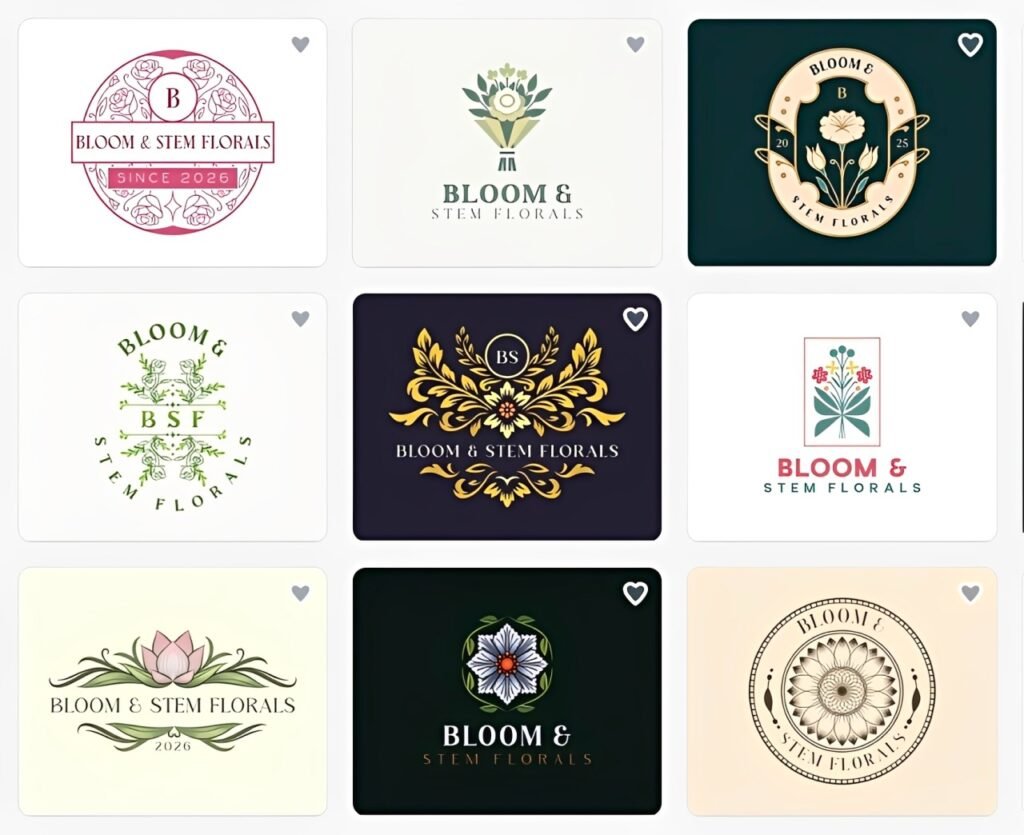
The results gave us several distinct directions. Some were elegant and minimal, while others leaned more heavily into floral imagery. This made it easier to compare different brand styles before choosing one to refine.
Once we selected a logo, the chat-based AI editor let us request changes to the icon, text, or overall look in plain language instead of adjusting every element manually.
Canva
We repeated the Bloom & Stem Florals brief in Canva. Its logo maker takes a more template-led approach, with a large selection of existing designs that can be adapted using its drag-and-drop editor.
Using the same flower shop brief, Canva produced these results:
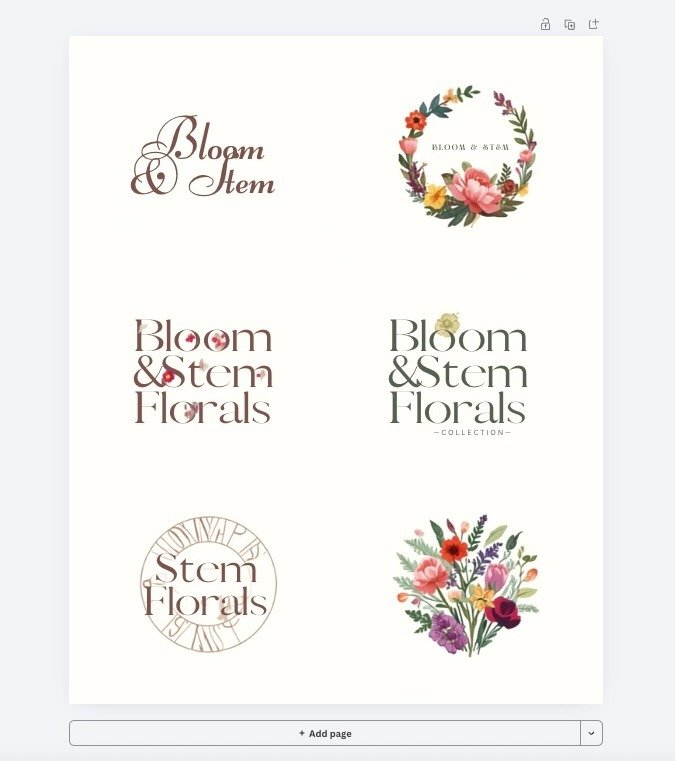
There were plenty of usable options, though some had a more familiar, template-driven look. Canva gave us extensive control over typography, colors, graphics, effects, spacing, and layouts, but getting to the final design required more manual decisions.
For the logo-making stage, Design.com came out ahead for its more relevant starting points and guided editing experience. Canva offers stronger hands-on control for users who prefer to shape more of the design themselves.
Where the Brand Assets Differ
A logo is only one part of a visual identity. Brand assets put that identity to work across the materials customers actually encounter, from business cards and social posts to stationery, presentations, and websites.
Design.com
Design.com builds these assets around the logo. Its automatic branding applies logo colors to matching social, print, and web templates, reducing the setup normally required when creating materials in different formats.
The platform covers:
- Business cards and digital business cards
- Social media posts and stories
- Email signatures and letterheads
- Flyers, posters, and menus
- Presentations
- Websites
- Printed merchandise
The initial logo can provide the visual foundation for many of the materials needed to establish a brand. There is less need to record color values, search for complementary designs, or establish the look again for each format.
For this comparison, we used a business card to see how easily the same identity could be carried into a practical brand asset.
Here’s the Bloom & Stem Florals business card created in Design.com:
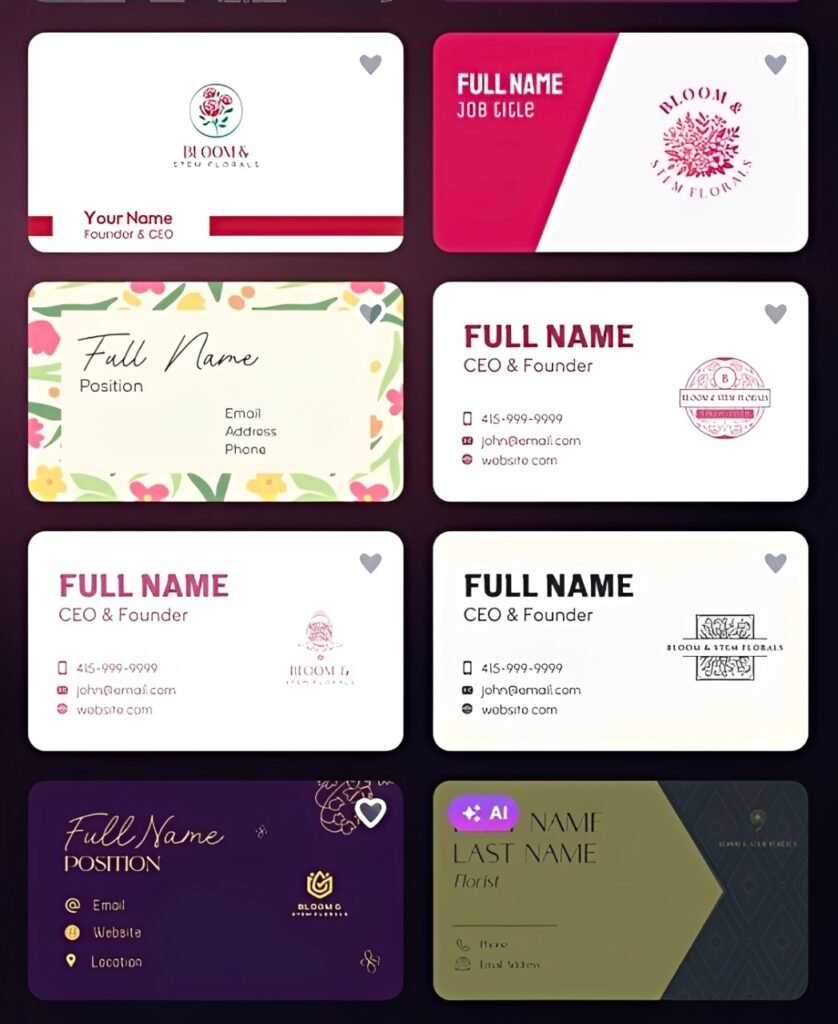
The result shows the practical benefit of the logo-first workflow. The identity adapts naturally to the business card without losing the visual direction established earlier. That becomes increasingly useful as a business creates more materials for print, social media, marketing, and its online presence.
Canva
Canva organizes brand assets through Brand Kit, which keeps logos, colors, fonts, imagery, graphics, and brand guidelines together. These elements remain accessible in the editor and can be reused across different designs.
Its branding can be applied to:
- Business cards and stationery
- Social media content
- Presentations and documents
- Flyers, posters, and marketing materials
- Websites
- Videos
- Printed products
Brand Templates provide reusable layouts for content a business creates regularly. Canva also offers Brand Controls on applicable plans. These can restrict fonts and colors, lock important design elements, and help teams follow established brand rules.
We used the same Bloom & Stem Florals identity for a Canva business card:
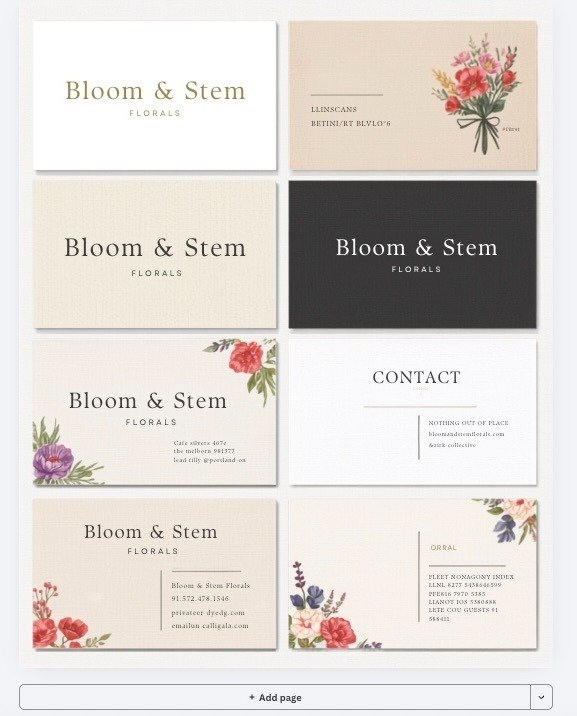
The result was usable and gave us plenty of control over the final design. The main drawback was that it required more hands-on decisions to get the card looking closely connected to the original identity.
Comparing Design Tools and Features
The final area is the wider toolkit. Canva has a broader creative workspace, while Design.com concentrates more of its features around practical business needs.
Design.com
Design.com includes 50+ design and branding tools, with AI generation built into several of them. The selection covers website creation, marketing, presentations, online presence, and print.
Some of the main tools include:
- AI website builder: Generate a business website, edit the content and design, and publish it online.
- AI presentation maker: Generate presentations for pitches, proposals, reports, and other business uses.
- AI social media generator: Create content for different social platforms without building every design manually.
- AI business card maker: Generate business card designs using business information.
- AI flyer and poster makers: Produce promotional materials for digital and print use.
- AI image generator: Create visuals using text prompts for different projects.
- Background remover: Remove image backgrounds for cleaner graphics and product imagery.
- Business name generator: Generate name ideas when setting up a new business.
- QR code maker: Create QR codes for websites, menus, promotions, and printed materials.
- Digital business card and link in bio: Publish shareable pages for business information, contact details, and important links.
- Domain registration: Search for and register a domain directly through the platform.
- Printing: Order business cards, apparel, mugs, mousepads, and other physical products.
There are useful features around the design process, too. Users can shortlist logo ideas and create voting polls to collect feedback before choosing a design. Design.com also provides 24/7 email and chat support.
The value is having many practical business tasks in one place. Users can generate creative work, build a website, register a domain, publish digital pages, prepare marketing content, and arrange printing without relying on several separate platforms.
Canva
Canva is considerably broader as a creative platform. Its Visual Suite combines graphic design with presentations, documents, spreadsheets, whiteboards, websites, video, photo editing, email, print, and collaborative work.
Its major tools include:
- Canva AI: Generate designs, images, text, and other creative content with AI.
- Presentations: Create slides with animations, charts, interactive elements, templates, and presentation features.
- Canva Docs: Combine written content with graphics, charts, videos, and other visual elements.
- Canva Sheets: Organize data and turn it into charts, reports, and visual content.
- Whiteboards: Brainstorm, diagram, plan projects, and collaborate on an open canvas.
- Video editor: Edit clips, audio, transitions, captions, effects, and other video elements.
- Photo editor: Adjust images, remove backgrounds, apply effects, and use AI editing features.
- Website builder: Design and publish responsive websites without coding.
- Social media tools: Create and resize content for different social platforms.
- Canva Print: Design and order business cards, posters, flyers, invitations, and other printed products.
- Collaboration: Co-edit projects, leave comments, assign tasks, and share work across teams.
Canva has the advantage in sheer creative breadth. Docs, Sheets, Whiteboards, video, and collaboration make it particularly capable for teams handling many different types of creative and productivity work.
That breadth comes with a trade-off. There are more content types, editing options, AI features, and workflows to navigate, which can make the platform feel busier for users who mainly need straightforward business design tools. Canva also does not offer the same integrated domain registration workflow as Design.com, so users need a separate service for that part of the business setup.
Pricing Across the Board
| Plan | Design.com | Canva |
| Free | $0 Free high-resolution and vector logo downloadsFree website builderFree link-in-bio creatorFree digital business card makerAccess to 50+ design toolsFree publishing for eligible templates | $0 Large template and stock libraryDesign and editing toolsBasic Brand KitAI toolsWebsite creation |
| Starter / Pro | Starter: $3/month billed annually or $9/month billed monthly High-resolution and vector logo filesUnlimited logo changesBusiness cardsInstagram and Facebook postsEmail signaturesLetterheads50+ design tools651,000+ templates | Pro: $180/year for one person Premium templates and stock contentPremium editing toolsExpanded Brand Kit featuresMore AI accessSocial content scheduling |
| Value / Business | Value: $4/month billed annually or $14/month billed monthly Everything in StarterWebsite | Business: $250/year per person Everything in ProAdvanced brand managementBrand approvalsTeam collaboration and admin toolsMore AI access |
| Premium / Enterprise | Premium: $5/month billed annually or $19/month billed monthly Everything in ValueLink in bioDigital business cards | Enterprise: Custom pricing Everything in BusinessAdvanced security and admin controlsMulti-team managementEnterprise brand controlsPriority support |
Final Verdict
For small businesses, Design.com offers a strong balance of ease of use, practical features, and affordability. The platform keeps branding straightforward while still providing enough flexibility to create something that feels specific to the business.
The real value comes from getting more out of a single platform without adding unnecessary complexity or cost. For business owners who want an accessible way to establish and maintain their brand, Design.com is our overall pick.